Job stages
Job stages allow you to create stages that can be assigned to jobs for reporting and grouping within reporting.
They are used:
- As a categorisation of the parent (or group) of a Cost centre on a job's Costings tab.
- To set the default values for Bill? on timesheets entries linked to cost centres assigned to the job stage.
- To determine whether or not a cost centre is added by default when a new job is created.
Examples of the job stages on a building project might be:
- Administration
- Design
- Construction
- Finalisation
- Warranty
 Features
- An unlimited number of Job stages can be defined in the system.
- There is only one set of job stages across all jobs, unlike cost centres which can be different for every job.
- You don’t have to have different job stages assigned to a job, but there must be at least one job stage to which cost centres on the job are assigned.
- The job stage name can be changed at any time, but this will automatically appear as the new name across every job both past and current.
Job stages form
Module: Job costing
Category: Job stages
Activation: Main > Job costing > Setup > Job stages
Form style: Single instance, SODA
Special actions available for users with Administrator permissions:
- Change the User ID of the Entered by field of memos.
- Edit memos entered by other users.
Database rules:
- A job stage cannot be deleted if it is referenced by any of the following:
- Jobs
- Timesheets
Field definitions
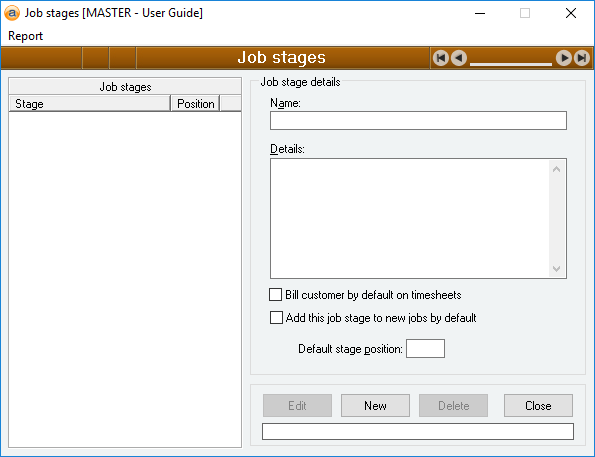
Job stages
The list of the job stages that are currently configured in your database, as well as their Default stage position if one has been set.
Name
Reference: text(30), mandatory
The name used to identify a job stage. This will appear in the Costings tab of any job a stage is linked to.
The name used here should be long enough to make it unique across all stages, but short enough to enable it to be used as a convenient identifier.
Details
Reference: memo, expandable
This is a general description of the job stage, its usage, and any other details you choose to include. When entering a stage's details, consideration should be given to the format of any reports or forms that use it.
Bill customer by default on timesheets
Reference: yes/No
If this option is on, timesheet entries that have a Cost centre that is linked to this Stage will automatically be set as billable (i.e. Bill? will be set to Yes).
If this option is off, timesheet entries that have a Cost centre that is linked to this Stage will automatically be set as non-billable (i.e. Bill? will be set to No).
This does not impact timesheet entries that do not have a Cost centre / Route specified. Please see Bill? for more information.
Add this job stage to new jobs by default
Reference: yes/No
If this option is on, this stage will be added to newly created jobs by default. The Cost centre will be pre-filled with the job stage Name
If this option is off, this stage will not be added by default to newly created jobs. It can still be added manually.
Default stage position
Reference: number
This is used to preset the order of any job stages that are added to a new job by default.
Only applies to job stages with Add this job stage to new jobs by default enabled.